
Buttons Are Squished Together
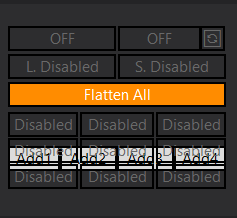
Buttons Are Squished Together
0
›
If you encounter a condition where the buttons may be overlapping. Please follow these steps:
- Please ensure that you are on the latest version!
- Right click on your chart tab (Bottom left hand corner) and ‘Duplicate in New Window‘
- Ensure that no other indicator or strategy is taking up the chart trader panel space. Load ONLY the Predator to avoid conflicts with other products.
– An example being my Free Order Entry buttons. Do NOT load both of them together because they use the same space. - Before enabling the Predator. Right click on your chart -> Reload Historical Data.
- In some cases, it may be necessary to restart NinjaTrader in order to refresh the chart panel.
It is highly recommended to use a separate window for each instance of the Predator. This is especially true when using the Custom signal system to read external 3rd party indicators.