Add Button Customize
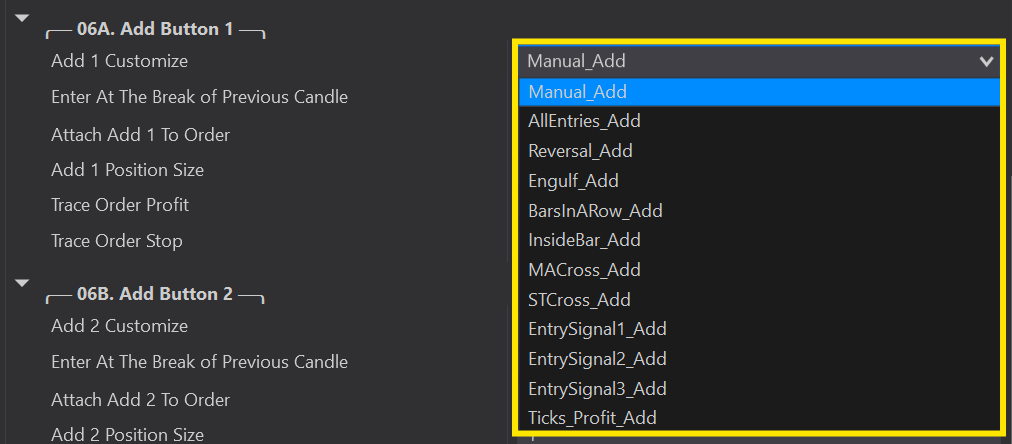
Choose how each Add button enters — manual, any auto entry, or by ticks in profit.
Add Customize offers a variety of add-on options — a manual entry, an auto entry, or even an auto entry using your Custom Signals.
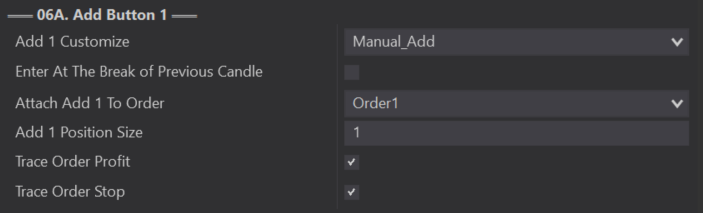
Leaves the power fully in your hands — you manually click the Add buttons on your chart trader panel when ready to enter or exit.
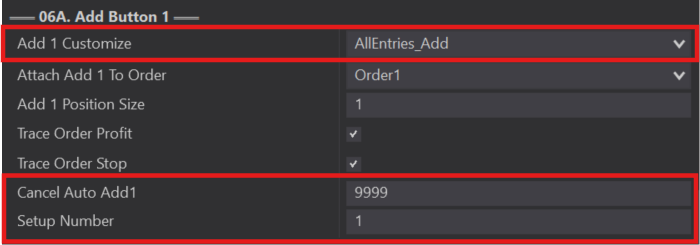
Your Add Button automatically enters when it detects a valid trade from any option selected in 02B Auto Entries (including auto entries used inside other Add Buttons). Alternatively, choose a specific Auto Entry to add with — anything under 02B Auto Entries — and mix and match if you like.
Cancel Auto Add: limits how many bars can pass after the initial entry before it stops looking for an add-on (default 9999 = always looking). Setup Number: staggers your auto add-ons — the first auto add after your initial entry is Setup 1, the second is Setup 2. Use the same number to add with all buttons at once, or increasing numbers to keep adding as more setups appear.
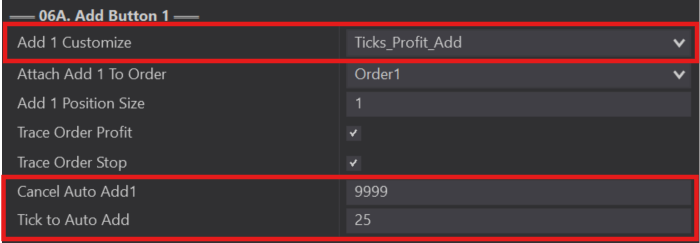
A highly requested feature — adds to your position once it reaches a set number of ticks into profit. You can use a positive or negative tick amount; a negative value is what you'd use for DCA-style trading.
Hint: if using a negative tick value, your Prevent DCA must be unchecked, or it will prevent all negative entries from triggering.