Historical back testing is limited and will never provide accurate results on any strategy!
It is always recommended to back test your strategy on Market Replay or live on a Sim for the most accurate representation. However, historical back testing can provide us with a quick overview to determine if we should continue testing with a more accurate method.
Follow the steps below to learn how to back test your strategy.
How To See Historical Trades / Past Performance
To see Historical Trades:
Load the Predator X on a Chart and configure any Entry and Filter conditions.
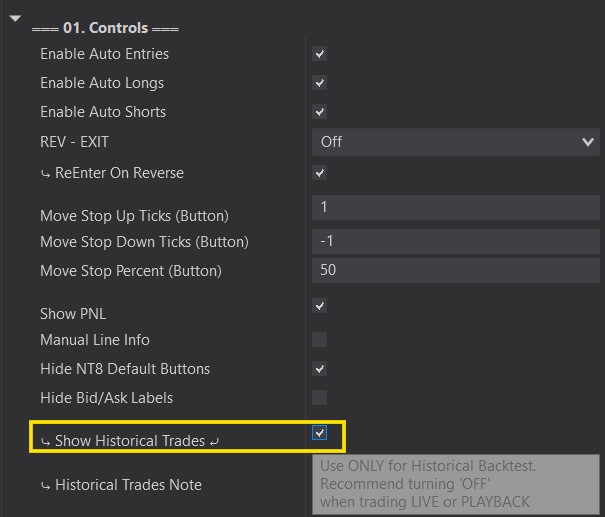
Activate the ‘Show Historical Trades’ option under 01. Controls.
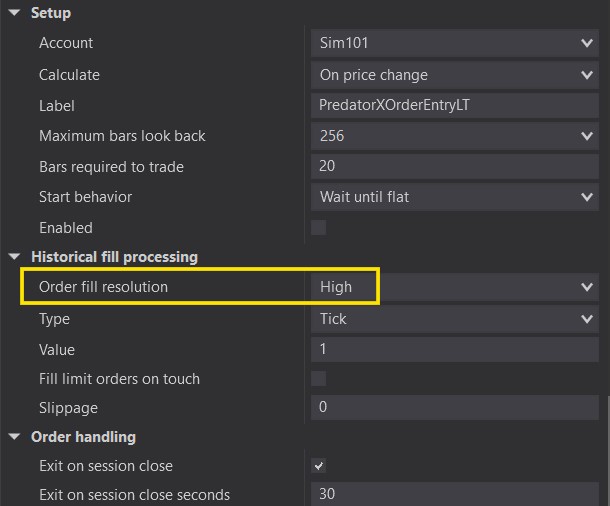
It is recommended to Activate High Fill Resolution when back testing (especially with ninzarenko style bar types)
Turn OFF ‘Show Historical Trades’ and change order fill resolution back to ‘Standard’ whenever you are trading live or using market replay.
Can I Use Strategy Anazlyer?
Only Built In Auto Entries can use Strategy Analyzer. Custom Signals are limited to Historical Trades on the chart only! See Above!
When using Strategy Analyzer, please stick to these rules:
Stick to ‘Backtest’ mode. Optimizer can easily create hundreds of thousands of iterations and cause issues.
Select ‘Show Historical Trades’ from 01. Controls.
Make sure you are connected to LIVE Data.
Select the Instrument you are back testing.
Select the Bar Type / Time /Size for the instrument
Select the Date Range you want to back test
Additional Notes if you do not see trades:
Ensure that you have something in Auto Entries selected.
Check that Time filters or Additional Filters are not preventing trades. (Remove temporarily to test)
Check that Indicators Filters are not preventing trades (03. Indicators)
Start on a fresh template and load one thing at a time to understand how each function may affect your strategy.
This is an Order entry and mangement tool. Just because it has many options, does not mean its a good idea to use them all at the same time. It is meant to be configured in many different ways. Please test what works best for you!
Best Way To Back Test - Market Replay
The recommended method to back test a strategy is using Market Replay.
Although this is much slower than a regular historical back test, Market Replay is often a much more accurate representation of how your strategy will actually perform. Market Replay also lets you see how the strategy would actually take trades in a live setting. You can make sure everything is acting as it should.
Please see video below if you need help downloading Market Replay Data: