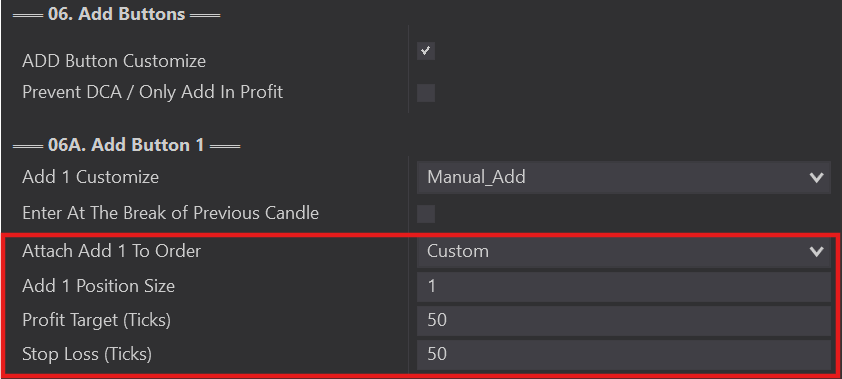
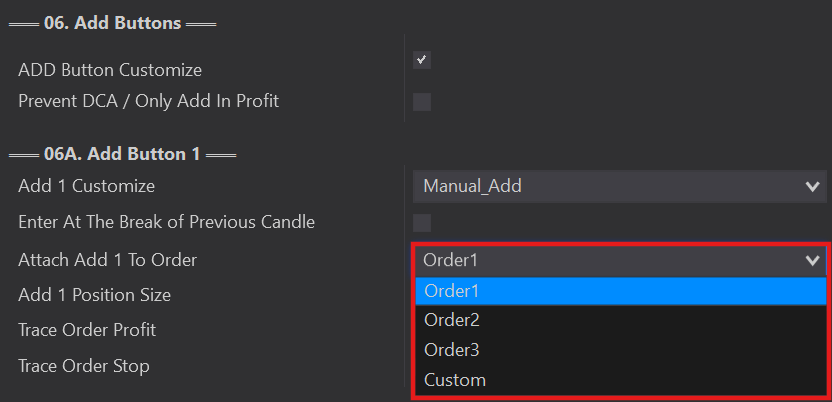
Attach each Add button to one of your Order Management targets.
Attach To Order
1
›
The Attach Add To Order option attaches your Add Button to one of your targets in the 04 Order Management section.
Cheat sheet: Order 1 = Target 1, Order 2 = Target 2, Order 3 = Target 3. You have 4 Add Buttons and can attach them all to the same order or to separate orders, depending on your needs.
Hint: attach your Add Button to your last order to be filled, so trail stops and breakevens continue to manage your add-button orders.
Custom Trace / Distance
›
You can 'Trace' any existing orders — or just the profit target, just the stop, or set a custom distance for both the profit and stop orders of the Add buttons.